The signature feature
Six routes. You pick none of them.
Every Unity process holds two parallel worlds — a managed one running C#, and a native one running compiled machine code. ZyMono inspects your DLL and the live process, then routes into the right world. Set the three inputs below and watch it decide, exactly as the app does.
Your mod DLL
Read from the PE header — plus [BepInPlugin] and [MelonInfo] if it's managed.
The game's runtime
Detected from the modules mapped into the live process.
Mod loader live in game
Loader-specific module signatures, not a folder on disk.
Every path, in the repo
The six routes
Three into the managed world, three into the native one. All of them have bounded timeouts, architecture validation, and a clean rejection when the pairing doesn't make sense.
Direct
In-memory Assembly.Load through the game's own Mono runtime. Your DLL is never
written to disk. Fast, self-contained, and the default when nothing is intercepting the game.
Pipe → BepInEx classic
Streams your assembly over a named pipe to ZyMonoReceiver.dll living inside
BepInEx. Loads on the Unity main thread, so Harmony patches apply cleanly.
Pipe → BepInEx-IL2CPP
ZyMonoReceiverIL2CPP.dll — a BasePlugin with an Il2CppInterop
class-injected dispatcher. Plugins auto-register through IL2CPPChainloader.
Pipe → MelonLoader
ZyMonoMelonReceiver.dll — a real MelonMod with an
OnUpdate-pumped dispatcher. Carries [MelonInfo]? No entry point
needed — the full lifecycle fires as if it had been in Mods/ at launch.
Native LoadLibrary
The game itself calls LoadLibraryW on your C++ DLL — path resolved from the
target's own kernel32 export table, so it stays correct injecting into x86
games from x64. Windows fires DllMain.
Native Manual Map
A full in-memory PE loader: parse headers, VirtualAllocEx, copy sections,
apply base relocations, resolve imports across every module in the target, then fire
DllMain via remote shellcode. The file never has to stay on disk.
Proxy preloader
Writes a build-time-generated winhttp.dll / version.dll stub next to
the game exe, with forwarded exports and a DllMain that loads your mod. The exact
mechanism BepInEx and MelonLoader use to bootstrap themselves — now available for your own
native mods, auto-loading at every future launch before ZyMono is even open. x64 only.
What you actually get
Built for real modding sessions
Not a proof of concept. Profiles, auto-inject, entry-point validation, a global hotkey, and a console that tells you what happened at every step.
Targets
- Auto-refreshing list of running Mono / IL2CPP Unity games
- Search box — type
Raft, get Raft.exe. Ctrl+F from anywhere - Runtime flavour, x86/x64, thread count, Steam AppID
- Loader badges: BepInEx live, MelonLoader live, receiver status
- Selection survives a game restart; clears when the game closes
- Right-click for a detail card, copy PID / path, open
Player.log
Smart routing
- Decides from the live process and the picked DLL — not folders on disk
- Detects which loader is live: BepInEx classic, BepInEx-IL2CPP, or MelonLoader
- Inspects your DLL: managed vs native, x86 / x64 / AnyCPU, attributes
- Auto picks the route — or force any of them by hand
- Router panel with a loader badge and one plain-English reason
- Harmony usage detected from your DLL and flagged
Confirmed delivery
- Three in-game receivers, one shared protocol
PING → HELLO,LOAD → ACKwith a version handshake- Loads on the Unity main thread — Photon / Harmony / Il2CppInterop safe
- Acknowledges success, or hands back the exact managed exception
- Receiver auto-discovery, install, and update-in-place
- Finds Thunderstore / r2modman profiles too
Entry points
- Reads your DLL's .NET metadata — browse Namespace.Class.Method
- Badges for static / void / arg-count, plus a "compatible only" filter
- Live validation:
✓ Entry point found, or exactly why not - Paste a whole
Namespace.Class.Methodinto any box — it splits itself - Optional unload entry point gives you an Eject button
- Native C++ or attributed mods: the column hides itself entirely
Profiles & auto-inject
- Save a full recipe — DLL, entry point, args, route — per game
- Cards with favourite, live-ready dot, one-click Inject, inline rename
- Flag a profile and it injects automatically when its game launches
- Configurable wait time so the runtime can finish loading
- Import / export as JSON
- Stored in a real file at
%APPDATA%\ZyMono— nothing lost on a crash
Console & UX
- Staged progress stepper —
Detect → Ping → Send → Confirm → Done - Copy / save / clear, auto-scroll, one click to the game's
Player.log - Drag-and-drop a DLL anywhere on the window; Recent DLLs dropdown
- Widescreen layout reflows 1 → 2 → 3 columns as the window grows
- Six accent themes, custom colour picker, high-contrast mode
- UI scale, density, corner style, window opacity, console font, reduce motion — kept in
settings.json - Global inject hotkey — fire from inside the game, no Alt-Tab
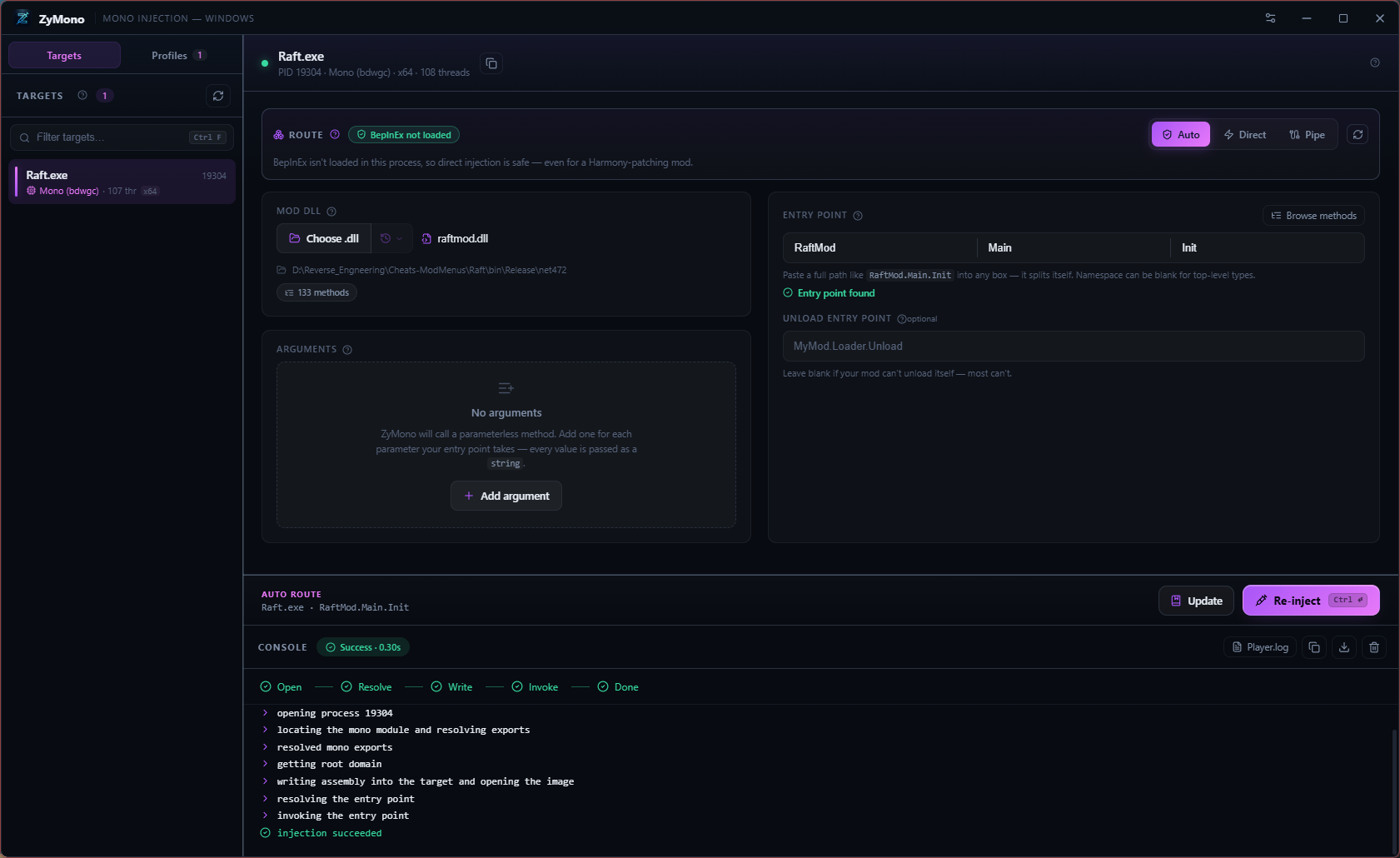
The main view — target list, the routing decision in plain English, entry point with live validation, and a confirmed trail through every stage.
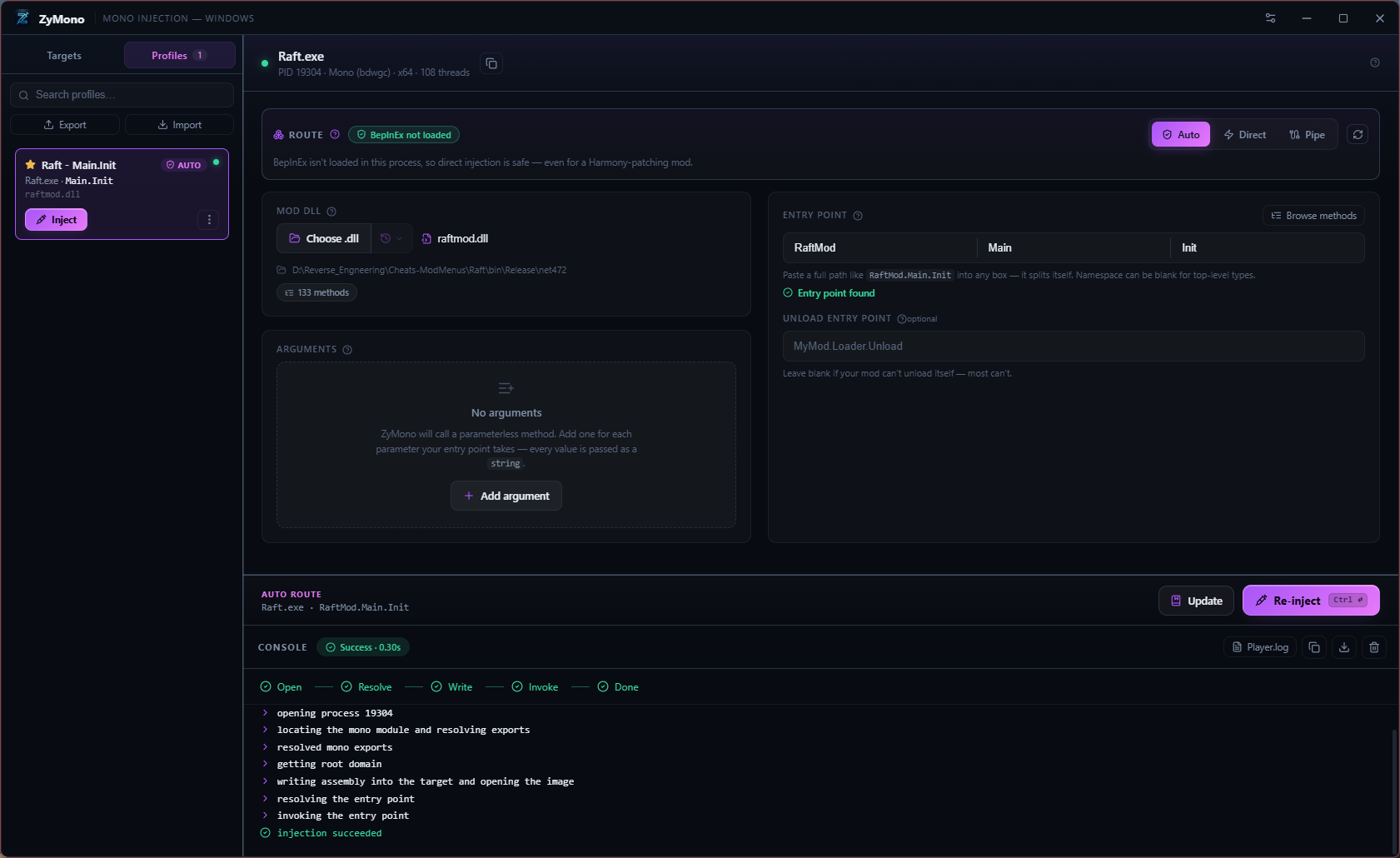
Profiles — favourites, auto-inject flags, import/export, and a live dot when the game is running.
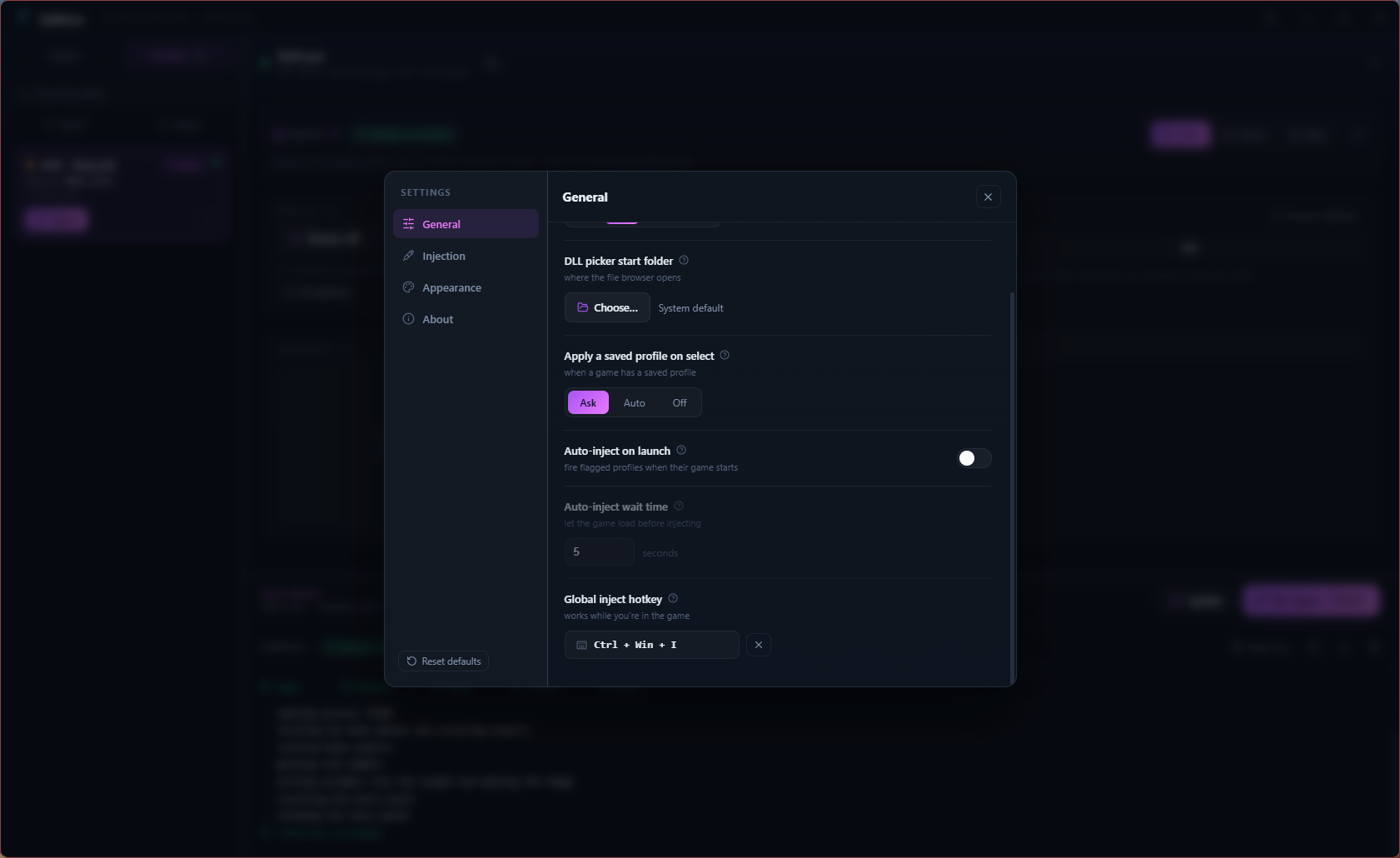
Settings — auto-inject on launch with a configurable wait, and the global hotkey that works in-game.
An honest comparison
Where ZyMono goes further
ZyMono builds on the well-known SharpMonoInjector technique and an earlier pipe-injection fork of it. Both deserve credit — SMI is a fine minimal tool, and the fork had the right instinct. Here's the difference in practice.
| Capability | SharpMonoInjector | SMI pipe fork | ZyMono |
|---|---|---|---|
| Direct in-memory managed load | Yes | Yes | Yes |
| Pipe route through an in-game receiver | No | BepInEx classic only | Yes3 receivers |
| IL2CPP game support | No | No | Yesnative + IL2CPP receivers |
| MelonLoader detection & bridge | No | No | Yesfull pipeline |
| Native C++ mod injection (LoadLibrary) | No | No | Yes |
| In-memory manual map for native mods | No | No | Yes |
| Proxy preloader (winhttp / version stub) | No | No | Yesgenerated at install |
| MelonMod / BepInPlugin auto-registration | No | No | Yeszero config |
| Route decided from the live process and the DLL | No | From a disk folder | Yes |
| Confirms the mod actually loaded | No | No | Yesping + ack |
| Loads on the Unity main thread | No | Partial | Yes |
| DLL classification — managed / native / AnyCPU | No | No | Yes |
| Entry-point validation before injecting | No | No | Yes |
| Detects Harmony usage in your DLL | No | No | Yes |
| Saved profiles + one-click inject | No | Partial | Yes |
| Auto-inject on launch | No | Yes | Yesconfigurable delay |
| Receiver auto-discovery, install & update-in-place | No | No | Yescorrect variant picked |
| Global hotkey — inject without Alt-Tabbing | No | No | Yes |
| Eject / reload a mod without restarting | No | No | Yesoptional unload entry |
| Interface | WinForms / CLI | Varies | Native UITauri · Rust · React |
The fork decided whether to use the pipe by checking for a BepInEx folder on disk, and sent the load with no confirmation — so it could route the wrong way, and you never really knew if your mod loaded. ZyMono checks whether the loader is genuinely live in the running process, pings the receiver before choosing, and its receiver is a real request/response protocol that acknowledges success or hands back the exact exception.
Compatibility
What it runs on, and what it loads
mono.dll and modern mono-2.0-bdwgc.dll[MelonInfo] MelonMods and [BepInPlugin] plugins — no entry point requiredGetting started
From download to injected
Launch your game
It appears in the Targets list on the left, with its runtime and architecture already identified.
Select it
ZyMono shows what's live inside the process — Mono or IL2CPP, which loader is mapped, whether the receiver answers — and pre-picks a route.
Choose your mod DLL
Browse for it, drag it onto the window, or pick it from Recent. Paste the whole Namespace.Class.Method into any box and ZyMono splits it for you, then confirms the method exists. Native C++ or attributed mods need no entry point at all.
Leave the route on Auto and press Inject
Watch the console step through Detect → Ping → Send → Confirm → Done. If something fails, you get the exact managed exception rather than a silent no-op.
Save it as a profile
Next time it's one click — or flag it for auto-inject so it fires the moment the game launches.
Optional — hotkey and eject
Bind a global hotkey in Settings → Injection to re-inject from inside the game, or fill in an unload entry point to get an Eject button that reloads your mod without restarting.
Rather build it yourself?
The source is the whole story
Building from source guarantees the app matches the code you can read on GitHub.
# Rust (MSVC) + Node LTS + VC++ Build Tools with the Windows SDK
git clone https://github.com/TheHolyOneZ/ZyMono
cd ZyMono
pnpm install
pnpm tauri build

# Installers land in src-tauri/target/release/bundle/
Questions
The things people ask
Does my mod need BepInEx?
Is IL2CPP supported?
Does ZyMono work with MelonLoader?
ZyMonoMelonReceiver.dll — a real MelonMod with a pipe server and an OnUpdate-pumped dispatcher. Drop a MelonMod DLL onto ZyMono, it detects the [MelonInfo] attribute, hides the entry-point column, and hands the assembly to MelonAssembly.LoadMelonAssembly — the full OnInitializeMelon / OnLateInitializeMelon / OnUpdate lifecycle fires exactly as if the file had been in Mods/ at startup.What's the difference between LoadLibrary and Manual Map?
LoadLibraryW on your DLL, so Windows' own loader maps it from disk and fires DllMain. Manual Map copies the DLL in as a memory buffer and runs the whole loader itself — section copy, base relocations, imports resolved through the target's own modules, then DllMain via a small remote shellcode. Use Manual Map when you want the file to never remain on disk; use LoadLibrary when your mod loads side files by relative path.What is the Proxy preloader for?
winhttp.dll or version.dll stub next to the game exe with forwarded exports and a DllMain that loads your mod. Drop it in once and every future launch auto-loads your native mod before ZyMono is even open. Currently x64 only.Why did it choose the pipe route?
It says "no receiver".
BepInEx/plugins/ or Mods/). Relaunch the game, or use Direct / native routes if a loader isn't running.Can I reload my mod without restarting the game?
MyMod.Loader.Unload) and an Eject button appears next to Inject. ZyMono calls that method on the copy of your assembly that is already loaded, so the statics it tears down are the ones your Init set up. Then just Inject again. Most mods can't unload themselves — leave the box blank and nothing changes.Can I inject without Alt-Tabbing out of the game?
Where does ZyMono store my profiles and settings?
%APPDATA%\ZyMono\profiles.json, so they survive crashes and force-kills. App settings and window layout are kept per-user as well.Is it free and open source?
Stop firing blindly.
Six routes, three receivers, and a confirmation that your mod actually loaded. Free, open source, and it updates itself.
0.2.0 predates the updater key rotation, so its in-app auto-update fails signature verification. Download the installer above and install once — everything from 0.3.0 onward auto-updates normally. Your profiles & settings in
%APPDATA%\ZyMono are preserved through the reinstall.